Audience List Cleaning with the "Clean My List" Feature
Keeping your audience list clean is essential for improving email deliverability, engagement rates, and overall campaign performance. Our Audience List Cleaning feature makes this easy by automatically identifying contacts that may be hurting your results. Contacts that fail to meet engagement or validity criteria will be marked as Inactive, while the rest will remain Subscribed.
How it works
This paid service scans your selected audience and identifies inactive, low-engagement, and suspicious email contacts based on activity and quality checks.
- Safe contacts: Remain Subscribed.
- Risky contacts: Contacts that fail to meet engagement or validity criteria will be automatically marked as Inactive.
- Processing time: Cleaning begins immediately after payment and typically finishes within 24 hour
How to clean your list
1. Import Your Audience List
Upload the required audience list from your CSV file into the system.
After the import is complete, navigate to See Results to review your uploaded contacts.
b. Under the Selected Audience and click the Clean My List button located near the top.
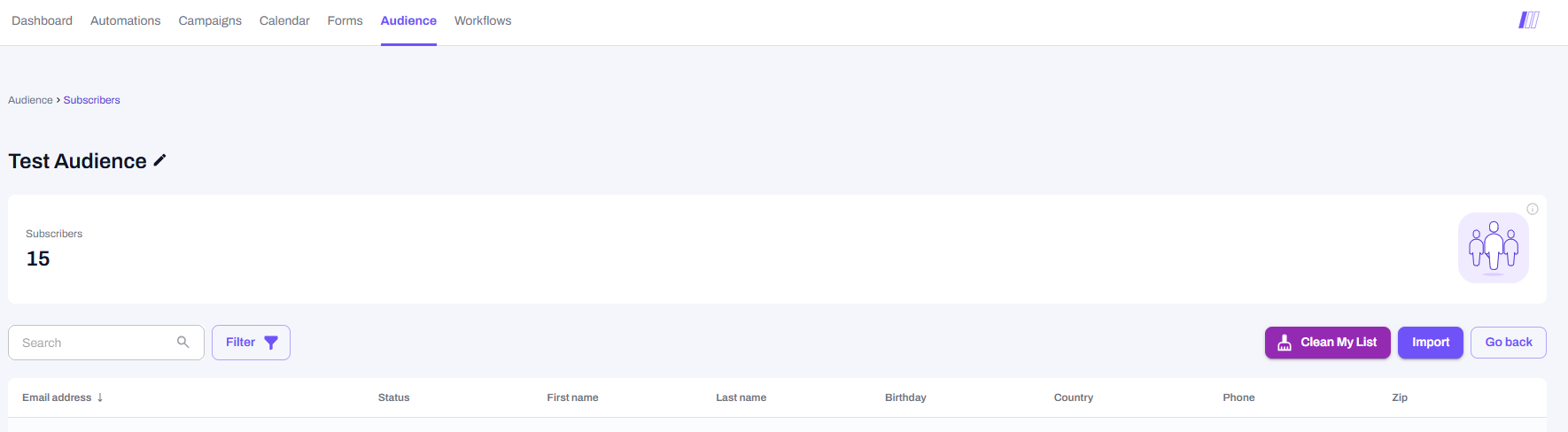
2. Review Pricing & Payment.
A pop-up will appear confirming the number of emails within your Audience and the cost
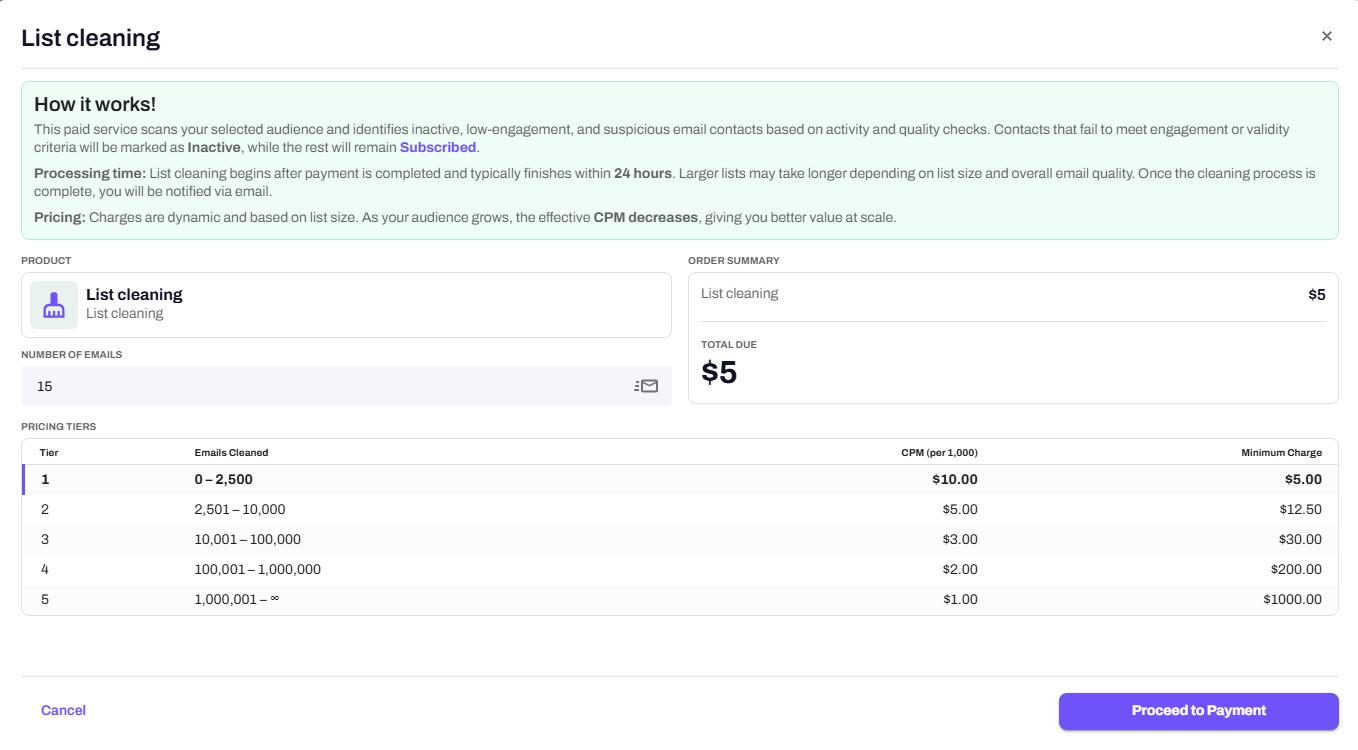
• Note: Pricing is dynamic based on Audience size; as your Audience size increases, CPM decreases.
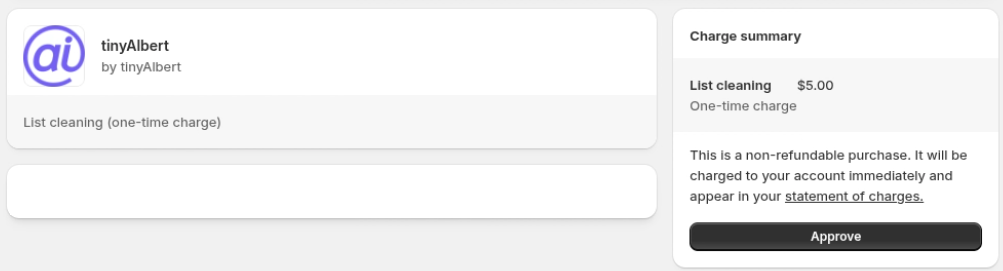
• Click Proceed to Payment to be redirected to the Shopify payment page to Approve the charge.
3. Processing.
Once the payment is processed, the cleaning process starts automatically.
- A small broom
icon will appear next to the audience to indicate that cleaning is in progress.
4. Completion.
When the cleaning is finished:
- You will receive a notification email.
- The icon
will update to show that the cleaning is complete.
- Contacts that failed verification are automatically marked as Inactive to prevent accidental emails.
Understanding you results
To review detailed results:
1. Click Download Cleaned List.
1. Click Download Cleaned List.
2. A CSV file will be provided with the detailed information including the following:
a. Recommendation.
- Safe_to_send: Deliverable with low-to-no threats. Safe to send.
- Send_with_caution: Possibly deliverable, elevated threat level.
- Do_not_send: Undeliverable or high threat level.
b. Score (1–10).
- Score 6–10 (Good to send): No threats or low threats detected.
- Score 1–5 (Risky): Considered risky and automatically marked as Inactive.
c. Delivery Status
- Deliverable: Likely real and safe.
- Possibly deliverable: Quality issues (may bounce or have low engagement).
- Undeliverable: Email does not exist or contains errors.
- Unknown: Status undetermined (usually due to server issues).
Conclusion
Using the Clean My List feature helps keep your audience lists accurate, up-to-date, and safe for communication. Once a list is cleaned, invalid or risky contacts are automatically marked as Inactive, reducing the chance of sending emails to undeliverable or problematic addresses.
Regularly cleaning your lists ensures better deliverability, higher engagement rates, and more reliable campaign performance. Reviewing the CSV report after each cleaning provides insight into contact quality, recommendations, and risk scores, helping you make informed decisions about your audience.
By maintaining clean and well-managed lists, your campaigns reach the right people at the right time, improving results and protecting your sender reputation.
Related Articles
Clean Up Your Shopify Integration Audience List
Clean Up Your Shopify Integration Audience List Scrub spam, bounces, and unsubs Removing email addresses flagged as spam, bounced or unsubscribed from a Shopify integration list in tinyAlbert is tricky. But we have a workaround. Remember, you can't ...Campaign Calendar Feature
Campaign Calendar Feature Customize campaigns and schedule a unique send date tinyAlbert users can send campaigns with user-defined schedules. You decide how many campaigns to send per week. You can also set the send time. If you want, send multiple ...Add Audience Contacts Manually
Add Audience Contacts Manually Grow your list with AI support List building just got a lot easier. If you want to add a small number of records to a new or existing audience, this is the AI-powered tool for you. A different article shows you how to ...What are the different ways of importing an audience list into tinyAlbert?
What are the different ways of importing an audience list into tinyAlbert? We support bulk (fast) and manual (tedious) options Effective list management is crucial for successful email campaigns. At tinyAlbert, we understand the importance of ...Does tinyAlbert segment an audience?
Does tinyAlbert segment an audience? No, campaigns are sent to all subscribers When tinyAlbert sends out a campaign blast, does it send to everybody or specific segments? tinyAlbert does not segment an audience. It sends a campaign message to every ...